


Abstract
This write-up documents the technical analysis and solution for Ace, a hard-category reverse engineering challenge authored for the Egypt National Cybersecurity CTF 2025. The challenge was designed to push the boundaries of Flutter Windows application security research, a relatively unexplored domain compared to its mobile counterparts.
The challenge implemented a multi-layered defensive architecture requiring participants to chain multiple advanced bypass techniques: defeating Windows anti-screen capture mechanisms, circumventing Flutter’s SSL certificate pinning with custom signature extraction, compiling modified Flutter engine binaries for Dart runtime introspection, and performing binary diffing against obfuscated Dart snapshots. This research contributes novel methodologies for Flutter Windows security assessment that can be applied to real-world application penetration testing.
Introduction
Flutter has emerged as a dominant cross-platform development framework, powering applications across mobile, web, and desktop platforms. While Flutter Android and iOS security research has received considerable attention from the security community, Windows desktop applications remain largely unexplored territory. This gap presents significant implications for organizations deploying Flutter-based desktop applications in security-sensitive environments.
The Ace challenge was specifically designed to address this research gap by implementing multiple defensive mechanisms that participants would need to systematically defeat. Each layer of protection required distinct technical skills and represented realistic security controls that organizations might implement to protect their Flutter Windows applications. The challenge structure served dual purposes: testing participant capabilities and advancing the collective knowledge of Flutter Windows security assessment methodologies.
This writeup serves as both a solution guide and a technical reference for security researchers venturing into Flutter Windows application analysis.
Phase 1: Initial Reconnaissance and Binary Analysis
Challenge Discovery
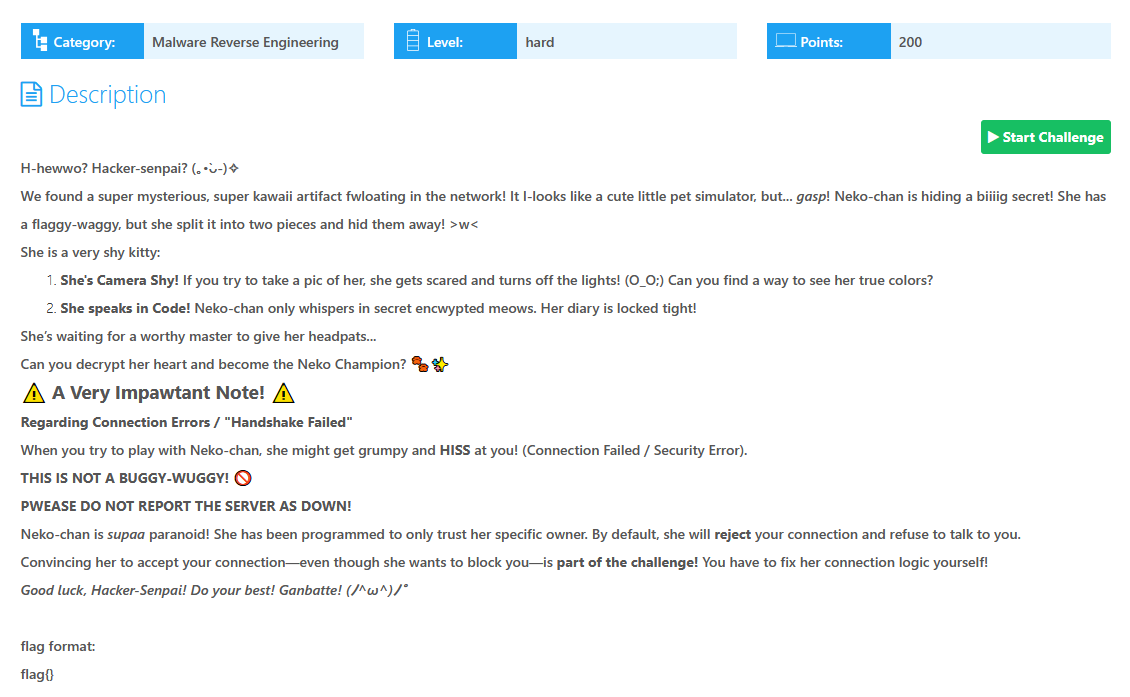
upon opening the challenge page we get this description which we might need to decipher but we’ll get to it later, so let’s start the instance and take a look.
File Structure Analysis
The downloaded challenge archive contained the following file hierarchy:
D:.| ace.exe # Flutter application wrapper| ace.pdb # Debug symbols (intentional inclusion)| dartjni.dll # Dart JNI bridge library| flutter_windows.dll # Flutter engine for Windows|\---data | app.so # Compiled Dart snapshot (AOT) | icudtl.dat # ICU internationalization data | \---flutter_assets | AssetManifest.bin | FontManifest.json | NativeAssetsManifest.json | NOTICES.Z | +---fonts | MaterialIcons-Regular.otf | \---shaders ink_sparkle.frag Stretch_effect.fragFlutter Windows Architecture Primer
Understanding Flutter’s Windows deployment model is essential for effective security analysis. Flutter Windows applications follow a specific architecture:
-
Executable Wrapper (
ace.exe): A thin native wrapper responsible for initializing the Flutter engine and loading the application snapshot. -
Flutter Engine (
flutter_windows.dll): Contains the core Flutter framework code, rendering engine, and Dart VM integration. This is typically consistent across Flutter applications built with the same SDK version. -
Dart Snapshot (
app.so): Contains the AOT-compiled Dart application code. Unlike JIT-compiled Flutter applications (debug mode), release builds use ahead-of-time compilation to native code, making reverse engineering more challenging. -
JNI Bridge (
dartjni.dll): Facilitates communication between Dart code and native Windows APIs through the Foreign Function Interface (FFI).
The official Flutter documentation provides reference for this structure at Building Windows apps with Flutter.
Phase 2: Anti-Screen Capture Bypass
Behavioral Analysis
Upon initial execution, the application window rendered correctly on the monitor but appeared completely black when attempting to capture screenshots, a clear indication of anti-screen capture protection.

Technical Investigation
The Windows API provides legitimate functionality for protecting window content from screen capture through the SetWindowDisplayAffinity function from user32.dll. This API is commonly used by applications handling sensitive content such as password managers, banking applications, and DRM-protected media.
Win32 API Reference: SetWindowDisplayAffinity
BOOL SetWindowDisplayAffinity( HWND hWnd, DWORD dwAffinity);Affinity Constants:
WDA_NONE(0x00000000) – No display restrictionsWDA_MONITOR(0x00000001) – Content visible only on physical monitors; excluded from screen capture APIsWDA_EXCLUDEFROMCAPTURE(0x00000011) – Content completely hidden from all capture mechanisms
String Analysis Confirmation
Using the strings utility on the app.so file confirmed the presence of screen capture protection:
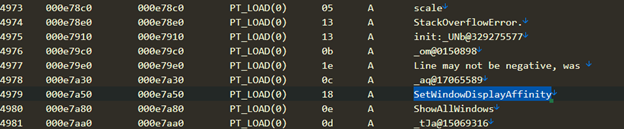
The presence of the API name in the compiled snapshot indicated direct invocation of this Windows API from the Dart application code.
Bypass Implementation
Frida, a dynamic instrumentation toolkit, provides an elegant mechanism for API hooking at runtime. The bypass strategy involves intercepting the SetWindowDisplayAffinity call and modifying the affinity parameter to WDA_NONE, effectively disabling the protection while maintaining application stability.
const mod = Process.getModuleByName("user32.dll");
// find the actual exportconst addr = mod.getExportByName("SetWindowDisplayAffinity");
// verify pointerconsole.log("[*] SetWindowDisplayAffinity @ " + addr);
// hookInterceptor.attach(addr, { onEnter(args) { // original affinity passed const orig = args[1].toInt32();
// override to NONE (0) args[1] = ptr(0);
console.log( "[+] SetWindowDisplayAffinity called with " + orig + " → forced 0" ); },
onLeave(retval) { // force success retval.replace(1); },});Execution and Results
The Frida script was executed with the following command:
frida -f ace.exe -l hook.jsOutput:
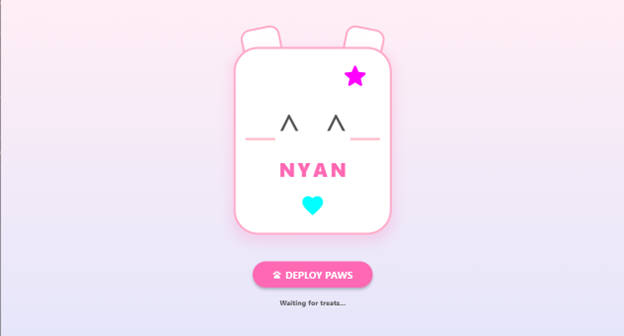
____ / _ | Frida 17.2.17 - A world-class dynamic instrumentation toolkit | (_| | > _ | Commands: /_/ |_| help -> Displays the help system . . . . object? -> Display information about 'object' . . . . exit/quit -> Exit . . . . . . . . More info at https://frida.re/docs/home/ . . . . . . . . Connected to Local System (id=local)Spawning `ace.exe`...[*] SetWindowDisplayAffinity @ 0x7ffb66e459b0Spawned `ace.exe`. Resuming main thread![Local::ace.exe ]-> [+] SetWindowDisplayAffinity called with 1 → forced to 0 (WDA_NONE)With the anti-screen capture protection disabled, the application content became visible for screenshot capture:
Challenge Progression
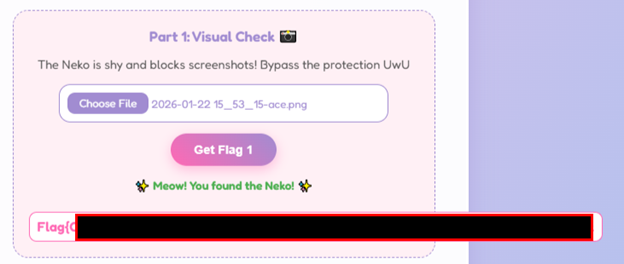
Submitting the captured image to the challenge validation endpoint confirmed successful completion of Phase 1:
Phase 3: Network Communication Analysis
Initial Network Investigation
Upon interacting with the application’s “Deploy Paws!” button, an HTTPS handshake error was immediately observed:
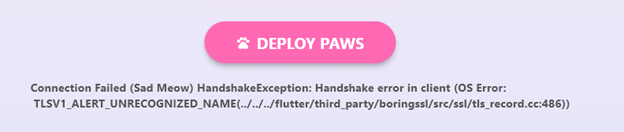
The challenge description had forewarned participants about expected network errors, suggesting that understanding and resolving these errors was integral to challenge progression.
Flutter Network Traffic Interception
Flutter applications handle network communication differently from typical Windows applications. The framework implements its own networking stack based on BoringSSL (Google’s fork of OpenSSL), which complicates standard traffic interception techniques.
Initial attempts using HTTP Toolkit with Proxifier (a tool for redirecting application traffic through a proxy) revealed a TLS handshake failure:

This behavior indicates the presence of SSL certificate pinning, a security mechanism that validates server certificates against a predefined set of trusted certificates, preventing man-in-the-middle attacks even when the client trusts a custom CA.
SSL Pinning Bypass Research
Flutter’s SSL pinning implementation resides in flutter_windows.dll within the ssl_verify_peer_cert function. The standard approach for bypassing Flutter SSL pinning involves locating this function in memory and patching it to always return success (0).
Reference methodology from InfoSec Writeups provided a Frida-based approach, but initial execution failed:
[+] Attempting to find and hook ssl_verify_peer_cert (1/5)[!] Flutter library found, but ssl_verify_peer_cert could not be found.[+] Attempting to find and hook ssl_verify_peer_cert (2/5)[!] Flutter library found, but ssl_verify_peer_cert could not be found....[!] ssl_verify_peer_cert not found. Please open an issue[!] Max attempts reached, stoppingThe failure indicated that the byte pattern signature for ssl_verify_peer_cert did not match the actual function implementation in the target Flutter version. This necessitated manual signature extraction.
Manual Function Signature Extraction
Using IDA Pro for static analysis, the flutter_windows.dll was loaded to identify the correct function signature:
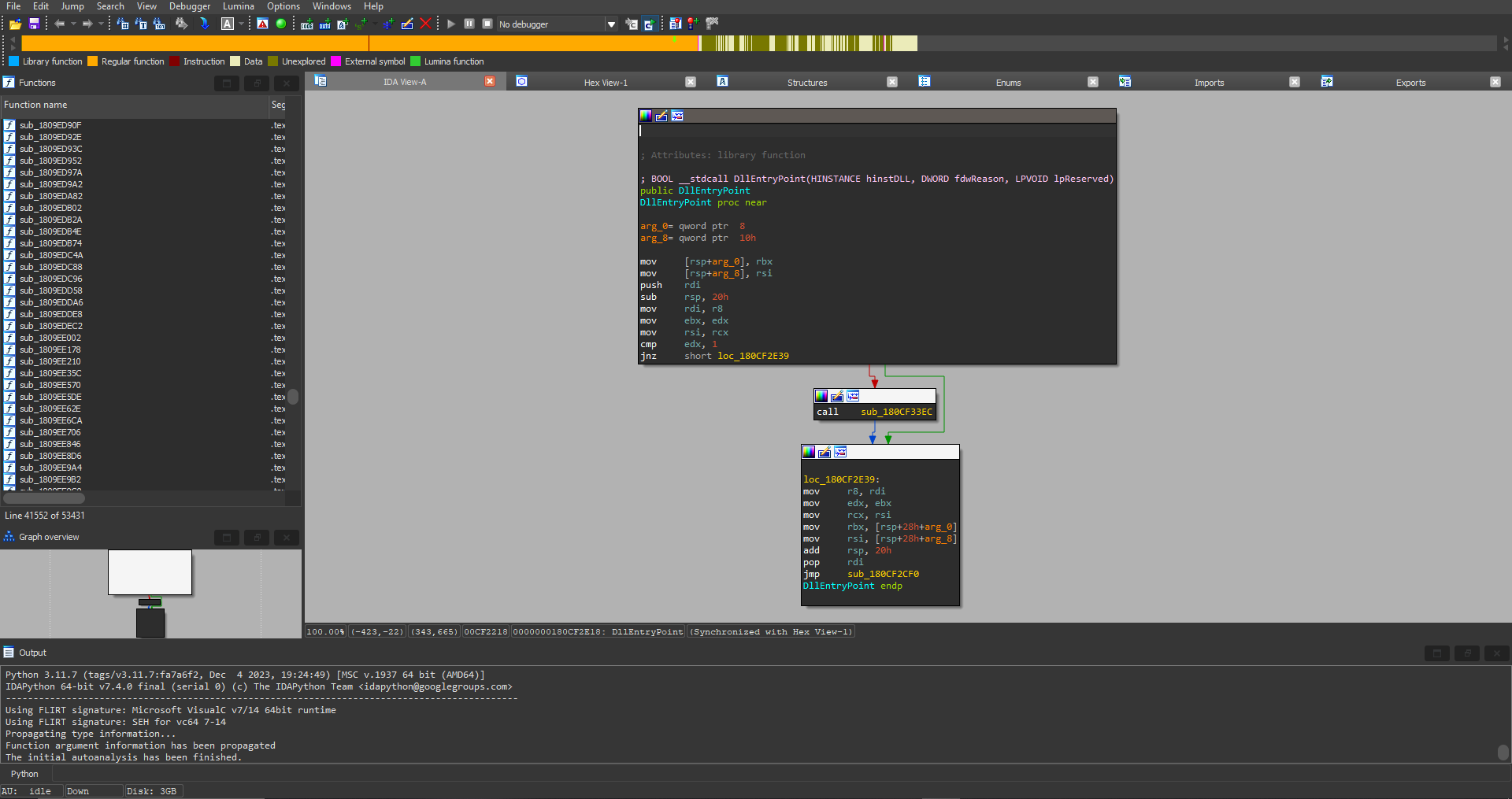
The analysis workflow proceeded as follows:
-
String Search: Using
Shift + F12to access the strings window and searching for “handshake”: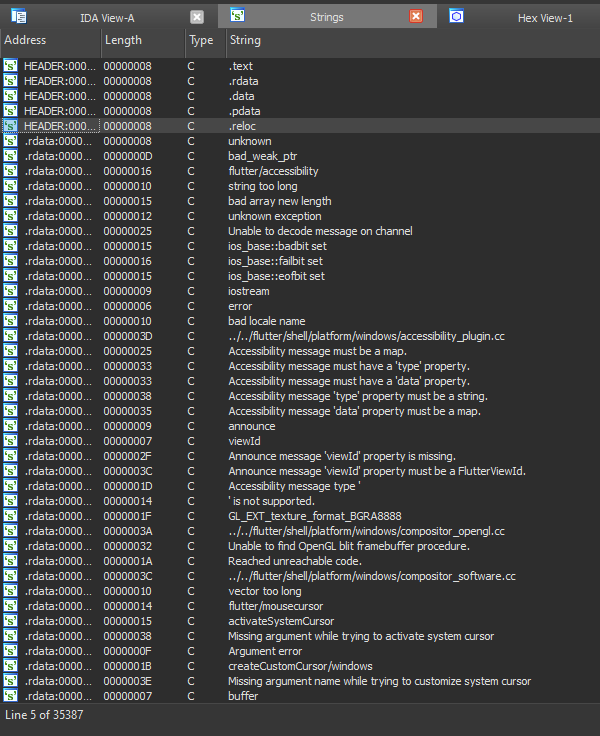
-
Cross-Reference Analysis: Locating the string
../../flutter/third_party/boringssl/src/ssl/handshake.ccand tracing its cross-references: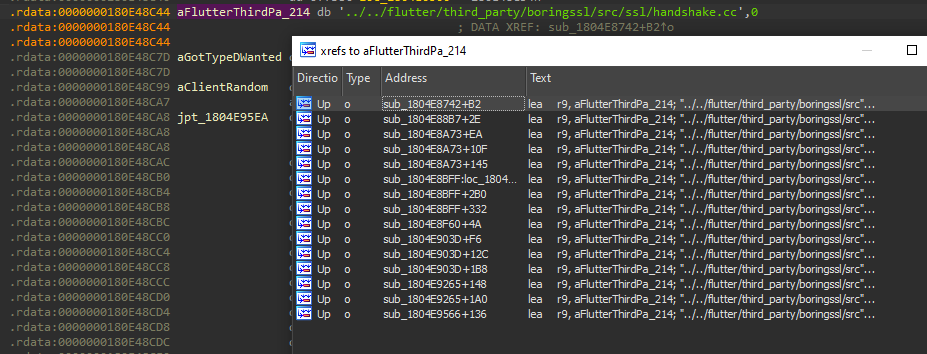
-
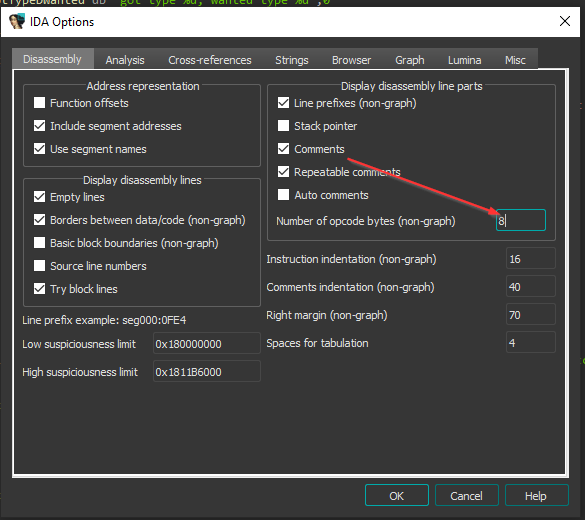
Function Identification: Enabling opcode bytes display in IDA Pro settings and analyzing the disassembly:
-
Signature Extraction: After examining candidate functions,
sub_1804E8BFFexhibited the characteristic pattern ofssl_verify_peer_cert: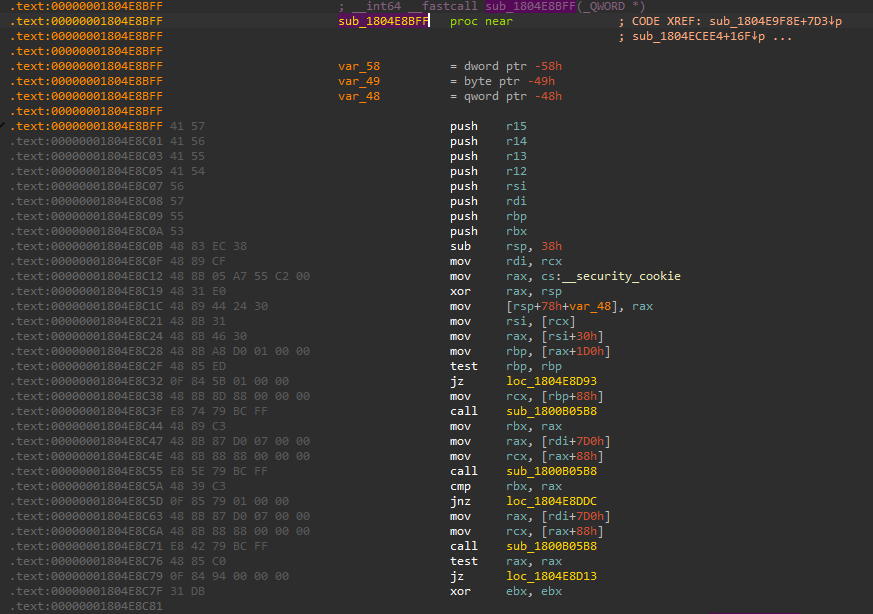
The extracted function signature (byte pattern) was:
41 57 41 56 41 55 41 54 56 57 55 53 48 83 ec 38 48 89 cf 48 8b 05 ab 45 c2 00Updated SSL Pinning Bypass Script
With the correct signature identified, the Frida script was updated:
/** * Flutter Windows SSL Pinning Bypass * * Modified version of: * https://github.com/NVISOsecurity/disable-flutter-tls-verification/blob/main/disable-flutter-tls.js * * This version has been updated to support Windows applications with * Flutter SDK versions where the ssl_verify_peer_cert signature differs * from the documented patterns. */
var config = { "windows":{ "modulename": "flutter_windows.dll", "patterns":{ "x64": [ // Updated signature for target Flutter version "41 57 41 56 41 55 41 54 56 57 55 53 48 83 ec 38 48 89 cf 48 8b 05 ab 45 c2 00" ], }, },};
var TLSValidationDisabled = false;var flutterLibraryFound = false;var tries = 0;var maxTries = 5;var timeout = 1000;
disableTLSValidation();
function disableTLSValidation() { if (TLSValidationDisabled) return;
tries++; if(tries > maxTries){ console.log('[!] Max attempts reached, stopping'); return; }
console.log(`[+] Attempting to find and hook ssl_verify_peer_cert (${tries}/${maxTries})`);
var platformConfig = config["windows"]; var m = Process.findModuleByName(platformConfig["modulename"]);
if (m === null) { console.log('[!] Flutter library not found'); setTimeout(disableTLSValidation, timeout); return; } else{ if(flutterLibraryFound == false){ flutterLibraryFound = true; tries = 1; } }
if (Process.arch in platformConfig["patterns"]) { var ranges = m.enumerateRanges('r-x'); findAndPatch(ranges, platformConfig["patterns"][Process.arch], 0); } else { console.log('[!] Processor architecture not supported: ', Process.arch); }
if (!TLSValidationDisabled) { if(tries < maxTries){ console.log(`[!] Flutter library found, but ssl_verify_peer_cert could not be found.`); } }}
function findAndPatch(ranges, patterns, thumb) { ranges.forEach(range => { patterns.forEach(pattern => { var matches = Memory.scanSync(range.base, range.size, pattern); matches.forEach(match => { var info = DebugSymbol.fromAddress(match.address); console.log(`[+] ssl_verify_peer_cert found at offset: ${info.name}`); TLSValidationDisabled = true; hook_ssl_verify_peer_cert(match.address.add(thumb)); console.log('[+] ssl_verify_peer_cert has been patched'); }); }); });
setTimeout(disableTLSValidation, timeout);}
function hook_ssl_verify_peer_cert(address) { Interceptor.replace(address, new NativeCallback((pathPtr, flags) => { return 0; // Always return success (no verification) }, 'int', ['pointer', 'int']));}Successful Bypass Execution
____ / _ | Frida 17.2.17 - A world-class dynamic instrumentation toolkit | (_| | > _ | Commands: /_/ |_| help -> Displays the help system . . . . object? -> Display information about 'object' . . . . exit/quit -> Exit . . . . . . . . More info at https://frida.re/docs/home/ . . . . . . . . Connected to Local System (id=local)Spawning `ace.exe`...[+] Attempting to find and hook ssl_verify_peer_cert (1/5)[+] ssl_verify_peer_cert found at offset: InternalFlutterWindows_WindowManager_GetFullscreen[+] ssl_verify_peer_cert has been patchedSpawned `ace.exe`. Resuming main thread!Network Traffic Analysis
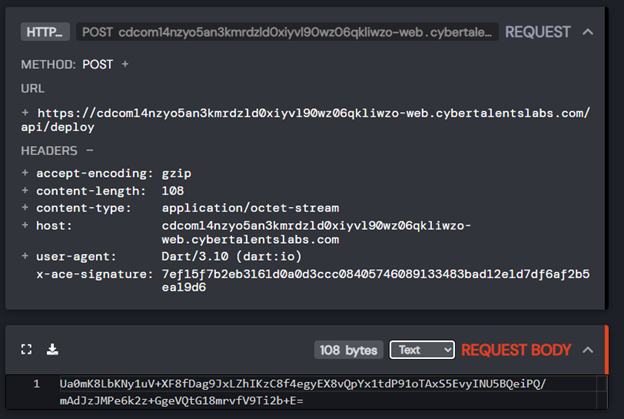
With SSL pinning disabled, HTTP Toolkit successfully captured the application’s network communication:
Key Findings:
- The application sends POST requests to
/api/deploy - Request body contains base64-encoded data
- A custom header
x-ace-signaturecontains what appears to be a hash of the request body (likely HMAC-based integrity verification)
Phase 4: Dart Snapshot Reverse Engineering
The Challenge of Dart AOT Snapshots
Loading app.so into IDA Pro revealed a fundamental challenge: no cross-references to string literals were available. This occurs because Dart AOT snapshots are deserialized at runtime by the Dart VM, with strings and symbols stored in a compressed format that static analysis tools cannot directly interpret.
Initial String Analysis
The strings utility provided initial insights into the application’s cryptographic implementation:
2405 000bf230 000bf230 PT_LOAD(0) 08 A AESMode.4234 000dbe80 000dbe80 PT_LOAD(0) 0a A ::AES_SALT2592 000c21e0 000c21e0 PT_LOAD(0) 0e A HMAC is closed5814 000f43c0 000f43c0 PT_LOAD(0) 0b A ::HMAC_SALT5854 000f4e90 000f4e90 PT_LOAD(0) 05 A /HMACThese strings confirmed:
- AES encryption for data encoding
- HMAC for request integrity verification
- Salt values for cryptographic operations
Modified Flutter Engine Compilation
To overcome the static analysis limitations, a more sophisticated approach was required: compiling a modified Flutter engine that dumps function offsets during runtime deserialization. This technique, inspired by the reFlutter project, provides accurate function mappings that static analysis cannot achieve.
reFlutter Architecture
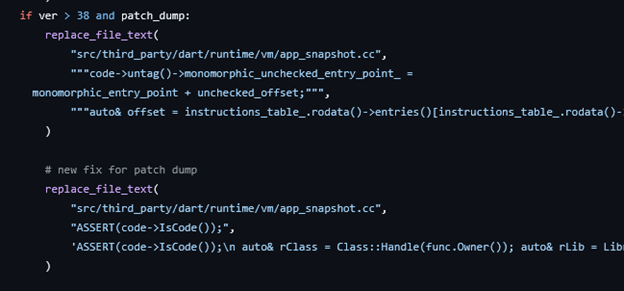
The reFlutter project patches the Flutter engine’s app_snapshot.cc file to intercept snapshot deserialization and log function metadata:
Custom Engine Modification
Following the compilation guide from Ostorlab’s Medium article, a custom Flutter engine was compiled with the following modification to app_snapshot.cc:
// Function offset dumping code inserted during snapshot deserializationASSERT(code->IsCode());auto& rClass = Class::Handle(func.Owner());auto& rLib = Library::Handle(rClass.library());auto& rlibName = String::Handle(rLib.url());
char offsetString[70];snprintf(offsetString, sizeof(offsetString), "0x%016" PRIxPTR, static_cast<uintptr_t>(code->untag()->monomorphic_unchecked_entry_point_));
JSONWriter js;js.OpenObject();js.PrintProperty("method_name", func.UserVisibleNameCString());js.PrintProperty("offset", offsetString);js.PrintProperty("library_url", rlibName.ToCString());js.PrintProperty("class_name", rClass.UserVisibleNameCString());js.CloseObject();
char* buffer = nullptr;intptr_t buffer_length = 0;js.Steal(&buffer, &buffer_length);
char pat[512] = { 0 };FILE *f = fopen("reflutter_dump.dart", "a+");if (f) { fprintf(f, "%s\n", buffer); fclose(f);}CRITICAL NOTEThe compiled engine’s snapshot hash must match the target application’s hash. The hash can be extracted from
app.sousingstrings. In this case:1ce86630892e2dca9a8543fdb8ed8e22.
Compilation and Deployment

After successful compilation, the original flutter_windows.dll was replaced with the modified version, and the application was executed to generate the function offset dump:
{"method_name": "qka", "offset": "0x000000000020eaec", "library_url": "dart:core", "class_name": "_RegExp"}{"method_name": "[]", "offset": "0x000000000020eb80", "library_url": "dart:core", "class_name": "_cb"}{"method_name": "<anonymous closure>", "offset": "0x0000000000000080", "library_url": "dart:_http", "class_name": "_kn"}{"method_name": "encode", "offset": "0x000000000000493c", "library_url": "dart:convert", "class_name": "Utf8Codec"}{"method_name": "decode", "offset": "0x000000000000e98c", "library_url": "dart:convert", "class_name": "Utf8Codec"}{"method_name": "normalize", "offset": "0x00000000000127b8", "library_url": "dart:convert", "class_name": "Base64Codec"}...Addressing Code Obfuscation
The dumped function names revealed Dart’s code obfuscation, function names like qka and _cb instead of meaningful identifiers. To overcome this, binary diffing was employed using BinDiff for IDA Pro.
The methodology involved:
- Creating a new Flutter application with the same Flutter SDK version
- Compiling without obfuscation
- Performing binary diffing between the obfuscated and unobfuscated
app.sofiles - Mapping function names based on structural similarity
Following the approach documented in Guardsquare’s Flutter reversing guide, the following function mappings were established:
{"method_name": "encode", "offset": "0x000000000000493c", "library_url": "dart:convert", "class_name": "Utf8Codec"}{"method_name": "decode", "offset": "0x000000000000e98c", "library_url": "dart:convert", "class_name": "Utf8Codec"}{"method_name": "decode", "offset": "0x000000000000ea48", "library_url": "dart:convert", "class_name": "Utf8Codec"}{"method_name": "normalize", "offset": "0x00000000000127b8", "library_url": "dart:convert", "class_name": "Base64Codec"}{"method_name": "_checkPadding", "offset": "0x0000000000012f94", "library_url": "dart:convert", "class_name": "Base64Codec"}{"method_name": "_inverseAlphabet", "offset": "0x00000000000130f4", "library_url": "dart:convert", "class_name": "_Base64Decoder"}{"method_name": "convert", "offset": "0x00000000001a37a8", "library_url": "dart:convert", "class_name": "JsonDecoder"}{"method_name": "decode", "offset": "0x00000000000296c4", "library_url": "dart:convert", "class_name": "JsonCodec"}{"method_name": "_JsonListener", "offset": "0x000000000000493c", "library_url": "dart:convert", "class_name": "_JsonListener"}Phase 5: Runtime Instrumentation and Data Extraction
Isolate Snapshot Calibration
Dart function offsets in Windows Flutter applications can shift between executions due to Address Space Layout Randomization (ASLR) and other memory mapping factors. To reliably hook functions, a calibration technique was developed using an “anchor function” with a unique byte signature.
Advanced Frida Hook Implementation
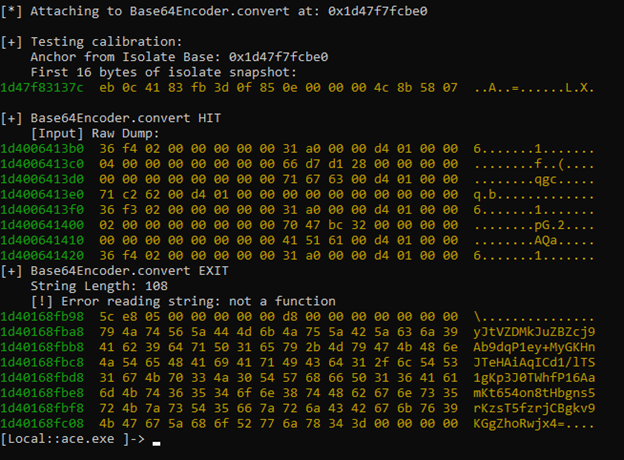
The following script implements isolate snapshot calibration and hooks the base64 encoding function to intercept plaintext data:
/** * Flutter Windows Runtime Instrumentation * * This script implements isolate snapshot calibration using an anchor function * to reliably locate and hook Dart runtime functions despite ASLR. * * Technique: Find unique function signature → Calculate isolate base → * Apply file offsets to locate target functions */
// Configuration: Anchor function for calibrationvar ANCHOR_FUNC_FILE_OFFSET = 0x1a23e4; // Base64Encoder.convert offset from FILE STARTvar ISOLATE_SNAPSHOT_BASE_FILE_OFFSET = 0x1D6B80; // _kDartIsolateSnapshotInstructions from FILE STARTvar ANCHOR_FUNC_SIG = "55 48 89 E5 48 83 EC 18 48 89 F3 48 89 75 F8";
// Global calibration variablesvar g_CodeBase = null; // Base address of ISOLATE SNAPSHOT in memoryvar g_ElfHeader = null; // Base address of ELF header in memoryvar g_GapSize = null; // Calculated gap between ELF header and isolate snapshot
console.log("[*] Waiting for application code to load...");console.log("[*] Mode: Isolate Snapshot-Based Calibration");
var scanInterval = setInterval(function() { if (g_CodeBase && g_ElfHeader) { clearInterval(scanInterval); return; }
// Locate ELF header (magic: 7F 45 4C 46 = \x7FELF) Process.enumerateRanges('r--').forEach(function (range) { if (g_ElfHeader) return;
try { var elfMatches = Memory.scanSync(range.base, Math.min(range.size, 0x1000), "7F 45 4C 46"); if (elfMatches.length > 0) { g_ElfHeader = elfMatches[0].address; console.log("[+] ELF Header found at: " + g_ElfHeader); } } catch (e) {} });
// Locate anchor function in executable memory Process.enumerateRanges('r-x').forEach(function (range) { if (g_CodeBase) return;
try { var matches = Memory.scanSync(range.base, range.size, ANCHOR_FUNC_SIG); if (matches.length > 0) { var anchorAddr = matches[0].address;
if (g_ElfHeader) { // Calculate isolate snapshot base // anchorAddr = IsolateBase + (ANCHOR_FUNC_FILE_OFFSET - ISOLATE_SNAPSHOT_BASE_FILE_OFFSET) var anchorOffsetFromIsolate = ANCHOR_FUNC_FILE_OFFSET - ISOLATE_SNAPSHOT_BASE_FILE_OFFSET; g_CodeBase = anchorAddr.sub(anchorOffsetFromIsolate); g_GapSize = g_CodeBase.sub(g_ElfHeader).sub(ISOLATE_SNAPSHOT_BASE_FILE_OFFSET);
console.log("\n[+] CALIBRATION SUCCESS!"); console.log(" ELF Header: " + g_ElfHeader); console.log(" Anchor Found At: " + anchorAddr); console.log(" Anchor File Offset: 0x" + ANCHOR_FUNC_FILE_OFFSET.toString(16)); console.log(" Isolate Snapshot File Offset: 0x" + ISOLATE_SNAPSHOT_BASE_FILE_OFFSET.toString(16)); console.log(" Anchor offset from Isolate: 0x" + anchorOffsetFromIsolate.toString(16)); console.log(" Calculated Gap: 0x" + g_GapSize.toString(16)); console.log(" -----------------------------------------"); console.log(" ISOLATE SNAPSHOT BASE: " + g_CodeBase); console.log(" -----------------------------------------");
// Verify calibration accuracy var expectedAnchor = g_CodeBase.add(anchorOffsetFromIsolate); console.log(" Expected Anchor: " + expectedAnchor); console.log(" Actual Anchor: " + anchorAddr); console.log(" Match: " + (expectedAnchor.equals(anchorAddr) ? "✓" : "✗"));
// Proceed to hook target functions hookBase64Convert(); } } } catch (e) {} });}, 1000);
// Convert file offset to memory addressfunction fileOffsetToAddress(fileOffset) { if (!g_CodeBase) { console.log("[!] Calibration not complete!"); return null; } var offsetFromIsolate = fileOffset - ISOLATE_SNAPSHOT_BASE_FILE_OFFSET; return g_CodeBase.add(offsetFromIsolate);}
// Hook Base64Encoder.convert to intercept plaintext datafunction hookBase64Convert() { var target = fileOffsetToAddress(ANCHOR_FUNC_FILE_OFFSET);
if (!target) { console.log("[!] Could not calculate target address"); return; }
console.log("[*] Attaching to Base64Encoder.convert at: " + target);
Interceptor.attach(target, { onEnter: function(args) { console.log("\n[+] Base64Encoder.convert HIT");
// Extract input data (Dart List<int> representation) var inputPtr = args[1];
if (!inputPtr.isNull() && (inputPtr.toInt32() & 1) !== 0) { var realInput = inputPtr.sub(1); console.log(" [Input] Raw Dump:"); console.log(hexdump(realInput, { length: 128, header: false, ansi: true })); } }, onLeave: function(retval) { console.log("[+] Base64Encoder.convert EXIT");
var resPtr = retval; if (resPtr.isNull() || (resPtr.toInt32() & 1) === 0) return;
var realRes = resPtr.sub(1);
try { // Read Dart String length (SMI at offset +8) var rawLen = realRes.add(8).readU32(); var strLen = rawLen >> 1; // Untag SMI (Small Integer)
console.log(" String Length: " + strLen);
// Read string data var dataPtr = realRes.add(16);
if (strLen > 0 && strLen < 100000) { var txt = Memory.readUtf8String(dataPtr, strLen); console.log(" Decoded Content:"); console.log(txt); }
} catch(e) { console.log(" [!] Error reading string: " + e.message); console.log(hexdump(realRes, { length: 128, header: false, ansi: true })); } } });}Data Extraction Results
The runtime instrumentation successfully captured the base64 encoding operations:
Further hooking of jsonEncode revealed the plaintext request payload:
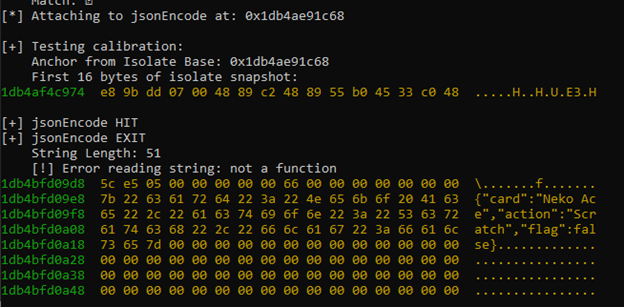
The captured JSON payload contained a flag field that could be modified at runtime before encryption and HMAC calculation.
Final Exploitation
The complete attack chain:
- Hook the JSON encoding function to intercept plaintext data
- Patch the
flagfield fromfalsetotruein memory - Allow normal encoding and HMAC calculation to proceed
- Capture the modified request from HTTP Toolkit
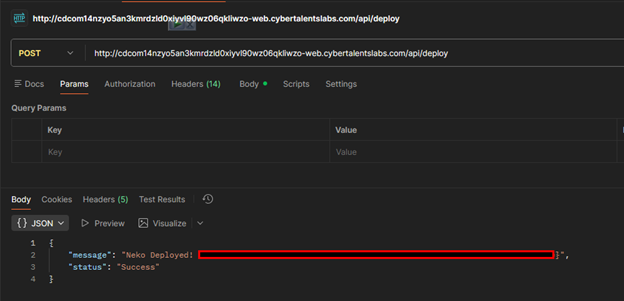
- Replay the request via Postman (using HTTP to avoid SSL issues)
Flag Capture:
Conclusion
The Ace challenge exemplified the evolving landscape of application security, where cross-platform frameworks introduce both new attack surfaces and new defensive opportunities. The successful solution required chaining multiple advanced techniques spanning Windows API manipulation, cryptographic protocol analysis, custom toolchain compilation, and runtime instrumentation.
As Flutter continues to gain adoption for desktop application development, security researchers and practitioners must develop platform-specific assessment methodologies. This research provides a foundation for Flutter Windows security analysis that can be extended and refined as the framework evolves.
References
- Flutter Windows Build Documentation
- Flutter Windows SSL Pinning Bypass - InfoSec Writeups
- reFlutter - Flutter Reverse Engineering Tool
- BinDiff - Binary Diffing Tool
- Guardsquare: State of Flutter Reversing
- Ostorlab: Flutter Reverse Engineering Guide
For questions, discussions, or collaboration opportunities, connect with the me on LinkedIn.
If this article helped you, please share it with others!
Some information may be outdated