


Today, I’m only going to cover MSP CTF Challenges for 2023
Which are these:
| Warmup | Easy | Medium | Hard | Insane |
|---|---|---|---|---|
| Code Crackers | ActivityHunt | Intent Infiltrator | Function Hookmaster | ADB PIN Hunter |
| Encoded Secret | Intent Choice Dilemma | Function Invokers Quest | Code Conflux | |
| FlagMosaic | Data Leakage Labyrinth |
Tools Used:
Adb: command-line tool that lets you communicate with a android device. Jadx-gui: tools for producing decompiling Java bytecode from Android Dex and Apk files. Device: Android Device / Android Studio Emulator / Any other Emulator like GenyMotion or LDPlayer (MUST BE ROOTED) Frida: dynamic code instrumentation toolkit CyberChef: intuitive web app for carrying out all manner of “cyber” operations. include simple encoding like XOR and Base64, more complex encryption like AES, DES and Blowfish Each Challenge has a different way of solving it, but I’m following the intended way
Warmup:
Code Crackers
You’ve been given the “CodeCracker.apk” app, which presents itself as a locked enigma. Your task is to reverse engineer the app to understand its inner workings and identify the method to unlock its secrets. Your ultimate goal is to find the hidden flag that has been concealed within the app.
It’s just a Warmup challenge, so we’ll find the flag in the class called e
Another way to solve it is to invoke this activity.
Easy:
ActivityHunt
The journey begins with the “Activity Hunt” challenge. Upon opening the app, you are greeted with a simple welcome screen and a “Start” button. Clicking the button reveals the first activity. Your goal is to traverse through a series of activities by entering specific keywords to unlock the path to the hidden flag. Stay vigilant; not all paths are correct.
This is a simple challenge. Just type the password in the text box and get the flag!
Encoded Secret
The next challenge, “Encoded Secret” dives into the app’s code. You encounter a function called “print_flag,” which seems innocent at first glance. However, the flag is cunningly encoded in base64 within the function’s code. Decode the flag to proceed, showcasing your static code analysis prowess.

In the MainActivity, it checks for a password, and if it is correct, it starts MainActivity2
And in MainActivity2 It gets the flag from Utilities.getFlag()
in Utilities.getFlag()
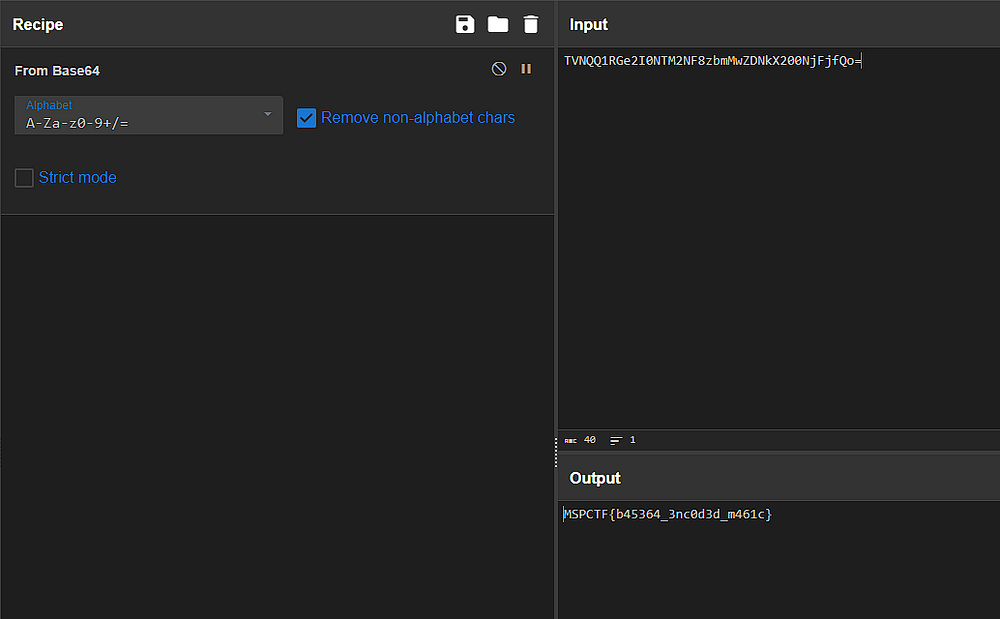
Looks like it’s encoded using base64. We can decode it using CyberChef.
FlagMosaic
“Flag Mosaic” awaits those who crack the code of the previous challenge. In this task, the flag is divided into pieces and scattered among multiple activities. Each activity holds a part of the flag. As you explore, gather the pieces meticulously to reconstruct the flag. Attention to detail is key in solving this puzzle.
We can find the divided flag in these classes.
Part 1: MSPCTF{m461c4l_ Part 2: cl455_h4ck3r Part 3: }
So the full flag is MSPCTF{m461c4l_cl455_h4ck3r}
Medium:
Intent Infiltrator
Now it’s time to play with intents in the “Intent Infiltrator” challenge. The app’s intent handling mechanism has a vulnerability. Exploit it to manipulate intents without extras and uncover hidden functionality. Tread carefully; unintended side effects might hinder your progress.
We find an uncalled activity called SecretActivity, so invoking it is the solution!
adb shell am start -n com.example.intentinfiltrator/.SecretActivity
Intent Choice Dilemma
You’ve been provided with the “Intent Choice Dilemma.apk” app, which offers two paths: user and admin. Your objective is to explore the app and find a way to manipulate it using intents with extras to grant yourself admin privileges.
We find that it checks for username and password and sets the Role to User.
So, we’ll invoke an intent with the admin Role as an extra.
adb shell am start -n com.example.useroradminchoosewisely/.Profile —es Role admin
Data Leakage Labyrinth
You are provided with the “DataLeakageLabyrinth.apk” app, which claims to store confidential user information securely. However, rumor has it that the app contains a vulnerable content provider that leaks sensitive data without proper authentication. Your goal is to exploit this content provider vulnerability and retrieve confidential data without using any unauthorized permissions or bypassing any security mechanisms. Your success will be measured by your ability to extract sensitive data using the app’s own features.
As the description says, it has a vulnerable content provider
Which can be queried with this command
adb shell content query — uri content://com.example.myapp.provider/data

Hard:
Function Hookmaster
Dynamic analysis takes center stage in the “Function Hookmaster” challenge. As you explore the app’s runtime behavior, you encounter opportunities to hook functions dynamically. Intercept and manipulate function calls to unlock secrets and advance further.
Based on the name and description, it’s about dynamic hooking
by loading it into JADX
MainActivity
By looking into the MainActivity, we find an onclick function with an if statement checks if the user is admin, and if true the user gets the flag, else it says You are not the Admin
and that check from Admin() just return false
Refactored code for easier understanding
public void onClick(View v) { if (this.Admin()) { this.textView.setText(Utilities.getFlag()); } else { this.textView.setText("You are not the Admin"); } }public boolean Admin() { return false; }So, our goal here is to hook Admin() and make it return true
Let’s fire up Frida!
by using JADX frida snippet function, we make our job a lot easier
Just right-click on the desired function name and choose
Copy as frida snippet
By doing this, we get this code:
let MainActivity = Java.use("com.example.functionhookmaster.MainActivity");MainActivity["Admin"].implementation = function () { console.log('MainActivity.Admin is called'); let result = this["Admin"](); console.log('MainActivity.Admin result=' + result); return result;};instead of return result We return true
let MainActivity = Java.use("com.example.functionhookmaster.MainActivity");MainActivity["Admin"].implementation = function () { console.log('MainActivity.Admin is called'); let result = this["Admin"](); console.log('MainActivity.Admin result=' + result); return true;};And then that’s the whole script
frida -Uf com.example.functionhookmaster -l hook.js
Java.perform(function() { let MainActivity = Java.use("com.example.functionhookmaster.MainActivity"); MainActivity["Admin"].implementation = function () { console.log('MainActivity.Admin is called'); let result = this["Admin"](); console.log('MainActivity.Admin result=' + result); return true; };});And that’s the result
That’s our flag!!
Function Invokers Quest
The journey concludes with the “Function Invoker’s Quest.” Your dynamic analysis skills are put to the ultimate test. Invoke functions dynamically to achieve specific objectives, uncover the final piece of the puzzle, and reveal the last hidden flag.
As in the previous challenge, we load it into JADX
We find that the onCreate The function is rather empty, but there’s an uncalled function called getFlag
So, we’ll invoke it!
Script:
frida -Uf com.example.functioninvokersquest -l hook.js
Java.perform(function(){ Java.choose("com.example.functioninvokersquest.MainActivity", { onMatch: function(instance){ console.log(instance.getFlag()) }, onComplete: function(){ console.log("Complete") } })})We just used the created instance (aka. object) to call getFlag function
Insane:
ADB PIN Hunter
You’ve been given the “Get_Za_Pin.apk” app, which seems to contain an unusual arrangement of PINs within its activities. Your objective is to use ADB commands to interact with the app and navigate through its activities to uncover the hidden PIN. This PIN will serve as the password to access a secure login page within the app.
loading it into JADX
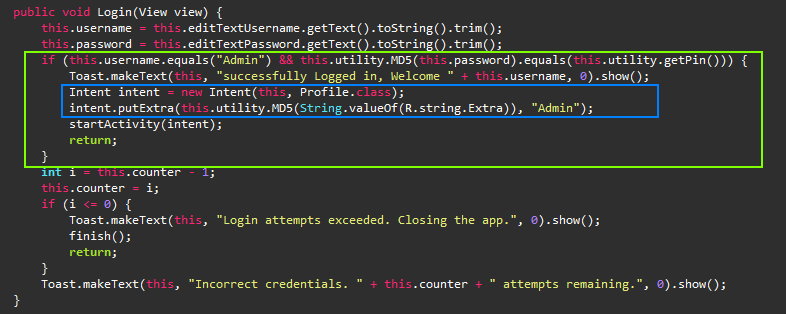
We aim to get the PIN to access the flag based on the description.
in the Login function, it checks if username is equal to Admin and the entered password is equal to the hashed PIN
By looking in the Classes, we find a Class that we’ll invoke using this command:
adb shell am start -n com.example.get_za_pin/.Pins
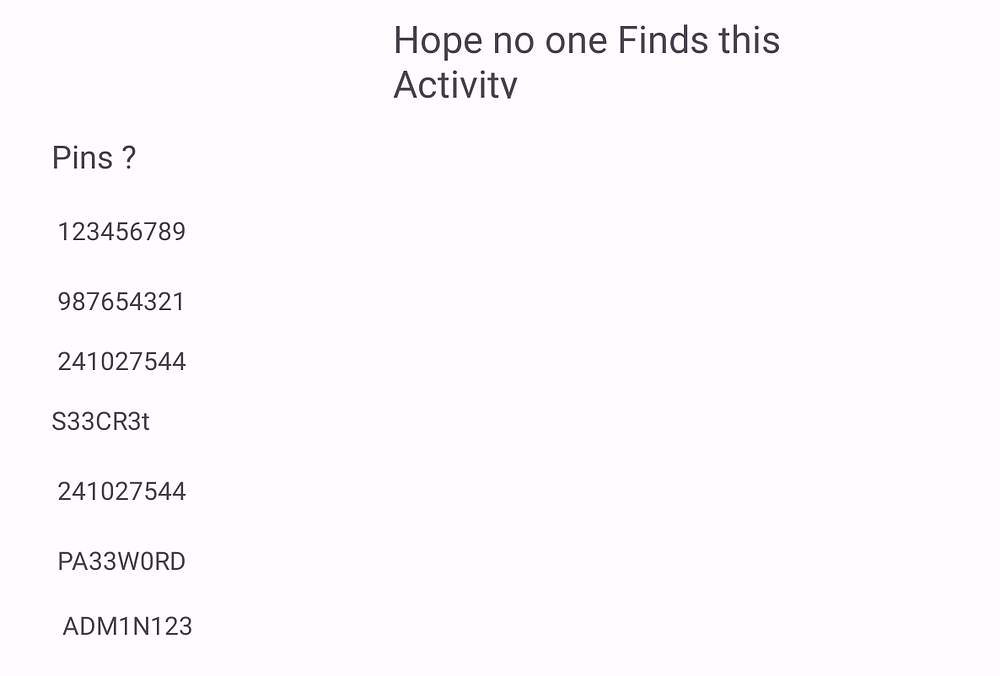
We find a list of PINs, by testing each one of them, the correct PIN is: PA33W0RD
Code Conflux
Welcome to the ultimate test of dynamic analysis and reverse engineering in the “Dynamic Enigma: Code Conflux” challenge! In this formidable challenge, you will need to harness your expertise in both function hooking and invocation to navigate a complex maze of code. Are you ready to unravel the mysteries within the depths of the app’s runtime behavior?
By looking into the MainActivity, we find that there’s an uncalled function named getFlag, but it has an admin check!
Seems familiar?
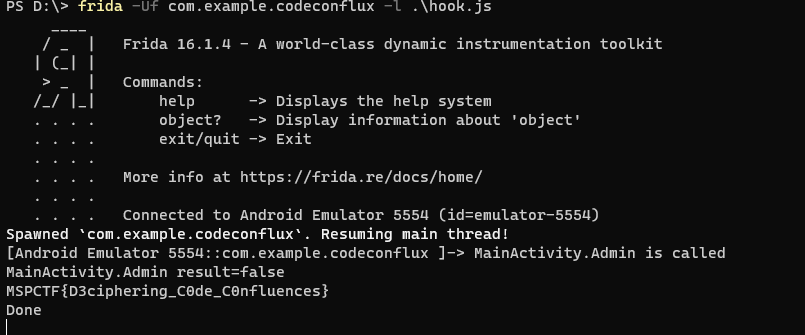
Yes! This is just a merge of the hard challenges. Which can be solved with this simple script.
Java.perform(function() { let MainActivity = Java.use("com.example.codeconflux.MainActivity"); MainActivity["Admin"].implementation = function () { console.log('MainActivity.Admin is called'); let result = this["Admin"](); console.log('MainActivity.Admin result=' + result); return true; };
Java.choose("com.example.codeconflux.MainActivity", { onMatch: function(instance){ console.log(instance.getFlag()) }, onComplete: function() { console.log("Done") } });});The first part overrides the implementation of Admin function to set it to true, and then it calls getFlag.
Thanks for Reading!
If this article helped you, please share it with others!
Some information may be outdated